


How the Images Are Made
In short
Every H-alpha image and every film on these pages is computed directly from the observatory's own recorded data: the FITS frames of the H-alpha telescope and the frame sequences of the Coronado telescope (a single-stack H-alpha telescope: it also observes only the red hydrogen-alpha line at 656.3 nm, through one etalon). Nothing is drawn, retouched, added or generated (no artificial intelligence, no painting, no cloning). The processing only decides how the recorded brightness values are shown on the screen, removes brightness changes that are not solar (limb darkening, uneven illumination, sky background) and, for the films, holds the disk still and averages a few real neighbouring frames. Every feature you see — sunspots, plage, filaments, prominences, flare brightenings — is present in the recorded intensities.
The raw files are never changed. They stay in the archive exactly as the camera wrote them; the images here are separate products made from them (6,210 of 6,210 H-alpha frames processed so far). The chosen settings of each image are stored with it and are available through the data API.
H-alpha images, step by step
A worked example below shows one frame after each of these steps.
- Sky background. The dark level around the Sun (the 1st percentile of the frame) is subtracted.
- Finding the Sun. The solar limb is located and a circle is fitted to it (centre and radius). This also works when part of the disk is outside the field of view.
- Quiet-Sun level. All values are divided by the median brightness of the inner half of the disk, so that the quiet Sun has the value 1. Images taken with different exposures or through thin cloud become directly comparable.
- Limb darkening. The Sun is naturally darker towards its edge. The average brightness at each distance from the centre is measured in the same frame and divided out, so that a feature looks the same at the centre and near the limb.
- Uneven illumination. Filters and optics illuminate the field slightly unevenly. This is measured as a very smooth surface (structures larger than about 15 % of the solar radius; sunspots and bright regions are excluded from the measurement) and divided out.
- Part of the limb darkening put back. A completely flat disk looks unnatural, and near the limb, where the Sun is darkest, dividing out the darkening would also multiply the camera noise. So 40 % of the measured darkening is put back (the limb, at about 57 % of the centre in the raw frame, is shown at about 80 %).
- Choosing the scale. A fixed, simple rule (gamma 1, i.e. a straight line; no contrast curve):
- the black point is the value below which 0.05 % of the disk lies, the white point the value above which 0.05 % lies, measured at full resolution;
- if these two are closer than 0.6 × the quiet-Sun level, both are moved apart equally to that width, so the brightness differences on the disk are enlarged by at most about 1.7 times.
- Outside the limb: two scales in one image. Prominences are far fainter than the disk, so they get their own scale. The scattered-light halo around the Sun is measured and subtracted; then the brightest prominence of the frame is shown just below white, and a mild curve lifts the faint ones. A thin zone along the limb keeps its natural brightness, so disk and off-limb part join without a seam. One image therefore shows both the disk and the prominences; no separate “limb” copy is needed.
- No sharpening. No sharpening or local-contrast step is applied to the still images.
- Colour. The result is shown with an H-alpha colour table (black → dark red → orange → near white), as is customary for H-alpha images. The colours are not measured; they are a palette. Each colour channel rises steadily with the brightness, so a brighter point is always shown brighter, and the brightness order of the image does not change. No information is added or removed.
The frames of each day are also given a sharpness score (seeing quality, measured on the raw frame before any scaling). The sharpest frame of the day is shown first.
What the processing cannot do: it cannot recover detail that was not recorded. Out-of-focus or over-exposed frames stay so (over-exposed frames are marked), and dust shadows in the optics (soft rings) remain visible because they are part of the recorded light.
A worked example: from the raw frame to the final image
Below, a single H-alpha frame (27.03.2024, “CCD Image 4”, 30 ms exposure) is taken through the steps above one at a time. Each picture is the
image after that step. All of them were computed with the site's own program (install/gorsel.py); the last one is the published
image, cropped around the disk. Click a picture to enlarge it.
Start: the raw frame

The camera wrote a 4,008 × 2,672 pixel, 16-bit frame with values between 765 and 60,855. Here the values are shown unchanged, on a linear scale (0 black, the brightest 0.01 % white). The active region and a few filaments can be made out, but most of the detail and the prominences outside the disk are nearly invisible, because solar structure differs in brightness by only a few per cent.
Steps 1–2: background and the solar limb

The sky level is 882 counts; it is only about 2 % of the disk brightness, so removing it is hardly visible. The blue circle is the solar limb that was found: centre (2,096.2, 1,220.1) px, radius 1,159.8 px. Every later step is measured relative to this circle (“distance from the centre”, “on the disk”, “off the limb”).
Steps 3–6: correcting the disk
To compare these steps fairly, the pictures are shown on the same fixed scale: 0.5 × the quiet-Sun level is black, 1.5 × is white.
 3. Quiet Sun = 1
 4. Limb darkening removed
 5. Measured illumination surface
 5. Illumination removed
 6. 40 % of the limb darkening put back
- 3. The median of the inner half of the disk is 42,364 counts; the whole frame is divided by it. The picture is unchanged, but every pixel now reads as “times the quiet Sun”. On this scale the limb darkening is obvious.
- 4. In the graph below, the orange line is the mean brightness measured in this frame against distance from the centre. It falls to 86% at 0.85 R, 73% at 0.95 R and 57% at 0.99 R. Each pixel is divided by the mean at its distance, and the disk becomes flat out to the limb.
- 5. The remaining large-scale slope is shown on its own in the third picture (on a ±15 % scale). Across the disk the illumination varies from 7.5% too low to 9.1% too high. This comes from the filter and the optics, not from the Sun. After dividing it out the disk has the same level everywhere; spots, plage and filaments were kept out of this measurement and stay as they are.
- 6. 40 % of the darkening is put back (dashed blue line in the graph): the limb is now shown at 80%. The disk still looks like a sphere, and the noise near the limb is not magnified more than necessary.

Step 7: the scale


The darkest and brightest 0.05 % of the disk lie at 0.67 and 1.23. They are less than 0.6 apart, so both are moved apart equally: the black point becomes 0.65, the white point 1.25. Brightness differences are enlarged 1.67 times. In the finished image 0.012% of the disk is pure white and 0.04% pure black.
Step 8: off the limb

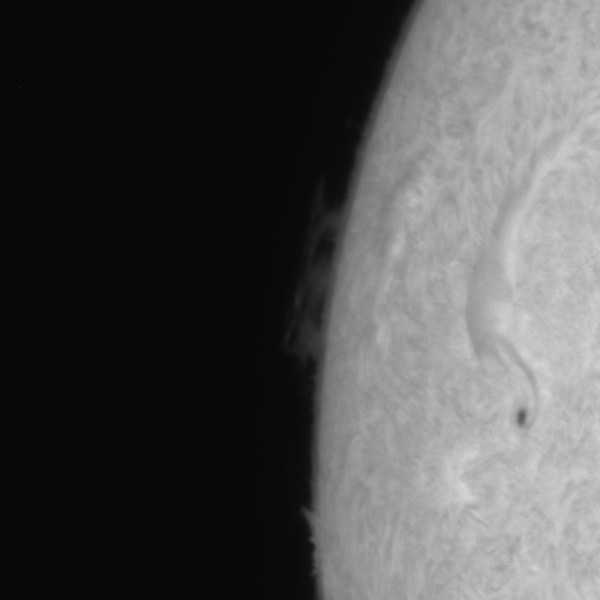
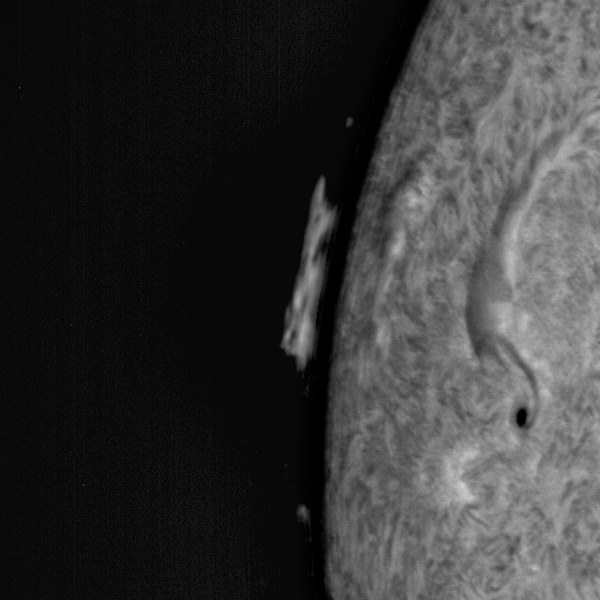
Most of the light outside the disk is light scattered in the atmosphere and the optics (the tail to the right of 1.0 R in the graph). It is subtracted; the brightest prominence of the frame is shown just below white, and a mild curve lifts the faint ones. In the close-up, the prominence on the left is only a faint smudge in the raw frame and appears with its inner structure after processing. The disk and the prominences are thus shown in one image, without separate copies.
Step 9: colour

The last step is only a colour table: the same grey values are shown in black → dark red → orange → near white. The two pictures contain the same data.
The active region at full resolution
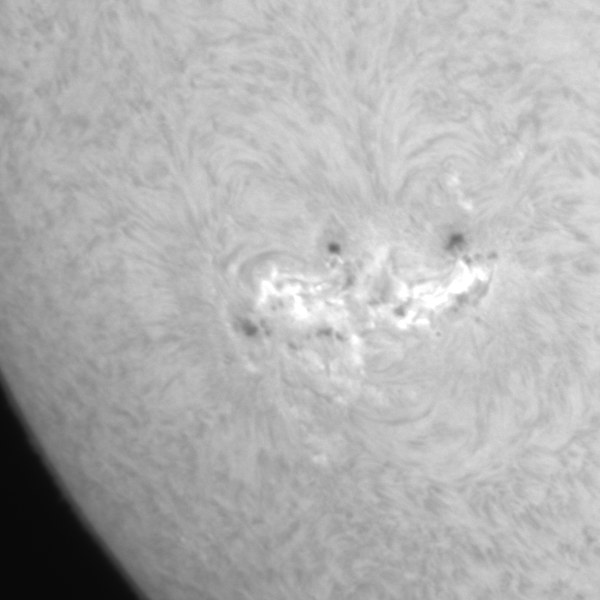

A full-resolution close-up of the active region. Only 0.14% of this crop is pure white; the structure inside the plage and the separate small spots are visible.
Start to finish
These pictures were made with install/yontem_ornek.py; the same program can be run on any other frame.
Films (Coronado and chromosphere videos)
- Every frame is measured as above (background, limb circle, quiet-Sun level, sharpness). Frames in which the Sun is not in the field, or less than 40 % of the disk is visible (for example when the telescope drifts), are left out and counted.
- Stabilisation. Each frame is shifted so that the centre of the solar disk stays in the middle of the picture. Only a shift is applied; the image is not warped.
- Averaging real frames. Each film frame is the average of the 3 sharpest of the 5 recorded frames around that moment. This reduces camera noise without blurring (a common method in solar imaging, often called “lucky imaging”).
- One scale for the whole film. The scale is chosen once, from the sharpest frames, with the same rule as for the still images (steps 6–8 above; for Coronado the black and white points may be as close as 0.3 × the quiet-Sun level, because its single etalon records much less contrast), and then kept fixed. No sharpening is applied. This matters for science: a flare therefore appears as a real brightening, instead of being toned down by an automatic per-frame adjustment. Each frame is still divided by its own quiet-Sun level, so thin passing clouds do not make the film flicker.
- Light curve. Under each film there is a graph of the brightest points of the disk and of the bright and dark (sunspot) area against time. A sudden rise of the brightest points may indicate a flare.
The films are shown with the same H-alpha colour table as the still images (both telescopes observe in H-alpha).
The films play at 24 frames per second, several times faster than real time; the time printed in each frame is the UT of the recording.
Photosphere drawings
The photosphere drawings are the observers' hand drawings, scanned and evaluated with the RDS program; they are shown exactly as scanned, with no image processing.
The programs are in the site's source code (install/gorsel.py and install/animasyon.py) and can be run again on the
raw data at any time.